Load the FRT and freecode files into the TS15
You can load FRT format file and freecodes into TS15 (Leica Viva) instruments. This allows you to use the instruments to input data to Surpac 6.2 and later versions.
The format file and freecodes are located in the SSI_ETC: directory, in the Leica_TS15.zip file. To load these to the TS15, you unzip the Surpac folders and transfer the files into the folders on a USB or SD card. You then transfer the files and freecodes from the storage device to the TS15 instrument.
The following procedure describes how to load the format file and freecodes using an SD card supplied by Leica.
- Insert the Leica SD card into your computer.
- Navigate to the Surpac SSI_ETC folder.
- Unzip Leica_TS15.zip.
- Copy the files in the Code folder.
- In the Leica SD card, navigate to the Code folder.
- Paste the files.
- In the unzipped Leica_TS15 folder, copy the files in the Convert folder.
- In the Leica SD card, navigate to the Convert folder.
- Paste the files.
- Remove the SD card from your computer and insert it into the TS15.
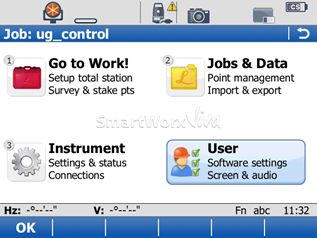
- On the main menu of the TS15, select User.
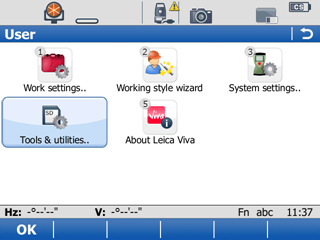
- Select Tools and utilities..
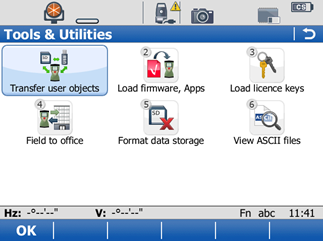
- Select Transfer user objects.
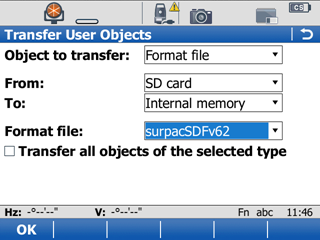
- Fill in the Transfer User Objects form as follows:
- In Object to transfer:, select Format file.
- In From:, select SD card.
- In To:, select Internal memory.
- In Format file:, select SurpacSDFv62.
- Clear the Transfer all objects of the selected type check box.
- Click OK.
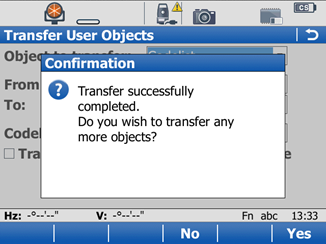
- Click Yes.
- Fill in the Transfer User Objects form as follows:
- In Object to transfer:, select Codelist.
- In From:, select SD card.
- In To:, select Internal memory.
- In Codelist:, select SurpacSDFv6.
- Select the Transfer all objects of the selected type check box.
- Click OK.
- To exit, click No.
 Tip: If you have installed Surpac to the default location on a Windows 7 machine, the SSI_ETC: folder is located at C:\Users\Public\GEOVIA\Surpac\6.6\share\etc
A confirmation statement is displayed.
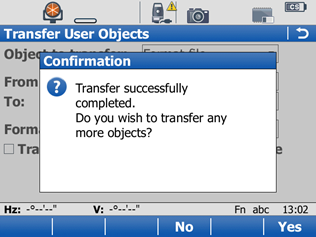
The file is uploaded and you return to the Transfer User Objects form.
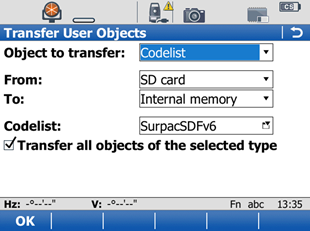
The files are uploaded, and a confirmation statement is displayed.