


Convert TPS1200 field file to Surpac .SDF format
This procedure describes how to convert a TPS1200 field file to the *.SDF format required for the SURPAC DATA RECORDER FORMAT function.
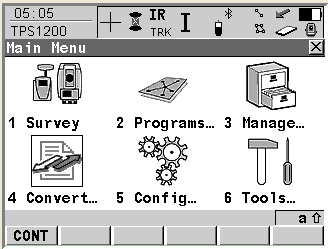
- On the main menu of the TPS1200 instrument, select Convert.
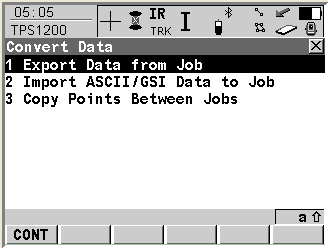
- Select 1 Export Data from job.
- Select the job to convert.
- Select the format file: SurpacSDFv6.FRT
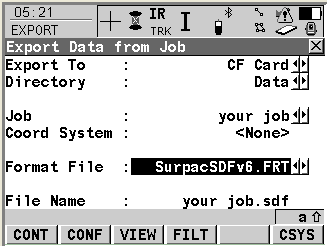
The *.SDF file will be created in the selected directory.
Run the SURPAC DATA RECORDER FORMAT function to process the *.SDF file.
 Note: While you are performing your survey with the Leica TPS 1200 instrument, you can enter the Surpac string number that you want the points to be created in, via the “Point Code” field in the user interface for the instrument.
This string number will then be carried forward into the Surpac .SDF file that is created for the survey.
Note: While you are performing your survey with the Leica TPS 1200 instrument, you can enter the Surpac string number that you want the points to be created in, via the “Point Code” field in the user interface for the instrument.
This string number will then be carried forward into the Surpac .SDF file that is created for the survey.