


Insert free codes in the TPS1200
This procedure describes how to insert a free code in the TPS1200.
A user menu key needs to have the “Select free code” function assigned to it.
- To select a free code, press the assigned key.
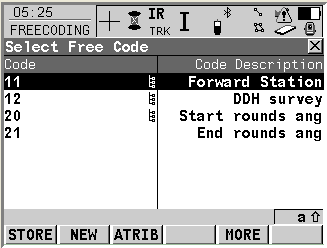
Free Code 11 allows you to enter the Station ID when you wish to create a new station by single face observations to a point.
Station id: This is the name of the new station to be created in the Surpac survey database.
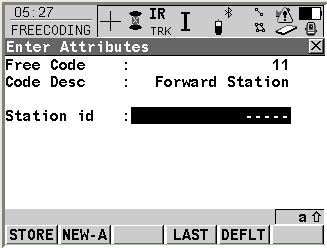
See the SURPAC DATA RECORDER FORMAT for more information on the use of code 11 in the Surpac .SDF file format.
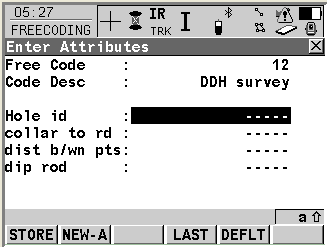
Free Code 12 indicates the start of a code block for a drill hole survey by the extended rod method.
Hole id: The ID of the drillhole
Collar to rd: Distance of the first observed point from the collar (along the rod)
Dist b/wn pts: Distance between the two observed points (along the rod)
Dip rod: The dip of the rod
See the SURPAC DATA RECORDER FORMAT for more information on the use of code 12 in the Surpac .SDF file format.
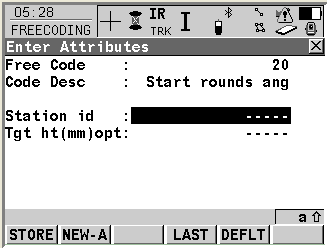
Free Code 20 indicates the start of a code block for creating a new station by multiple face observations to a point.
Station id: This is the name of the new station to be created in the Surpac survey database.
Tgt ht (mm) opt: This is the height from the floor to the target. This is an optional value, only enter a value here if you wish this value to be stored in Surpac. Important: The " Tgt ht (mm) opt " is divided by 1000.0 when processed by Surpac. This means that if your normal coordinate units are metres, then the " Tgt ht (mm) opt " value must be entered in millimetres
See the SURPAC DATA RECORDER FORMAT for more information on the use of code 20 in the Surpac .SDF file format.
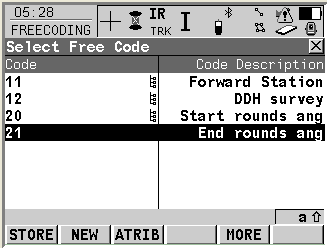
Free Code 21 indicates the end of a code block for creating a new station by multiple face observations to a point.
See the SURPAC DATA RECORDER FORMAT for more information on the use of code 21 in the Surpac .SDF file format.
- Select “Store” key to save codes.