


Intersect polygons
This function provides a general purpose polygon intersection utility. The purpose of polygon intersection is to take 2 closed shapes and produce a new closed shape by performing one of the following three tasks:
- Intersection, or
- Outersection, or
- Exclusive outersection (another term for the Union of two shapes).
To run this function: Choose File tools > Intersect polygons, or...
In the polygon intersection process we refer to one of the closed strings as the intersecting string and the other as the intersected string. This is important as the order of specifying the strings and the type of operation performed can have an effect on the resultant string.
Shown below are the results of each of the different types of operations.
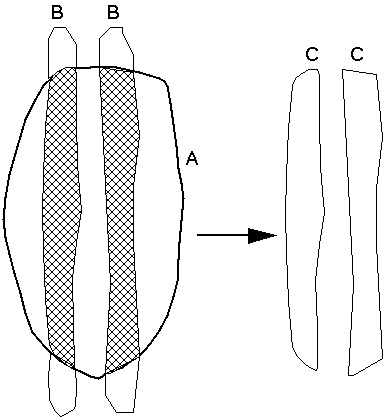
Intersection
Intersecting string = A
Intersected string = B
Operation = Intersection
That is, string A intersects string B and the resultant string is shown on the right. Note that the order of defining the two strings is immaterial for the intersection operation as the result is always the same.
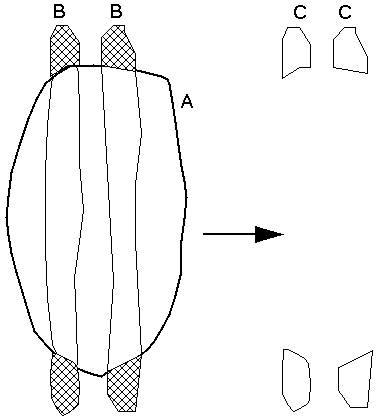
Outersection
Intersecting string = A
Intersected string = B
Operation = Outersection
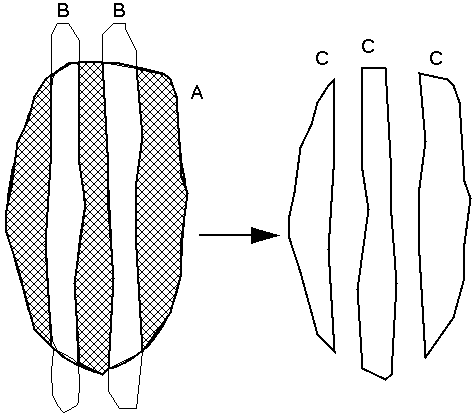
That is, string A outersects string B and the resultant string is shown. Note that the order of defining the two strings is important for the outersection operation as the result will be different if the order is reversed as shown by the second diagram below.
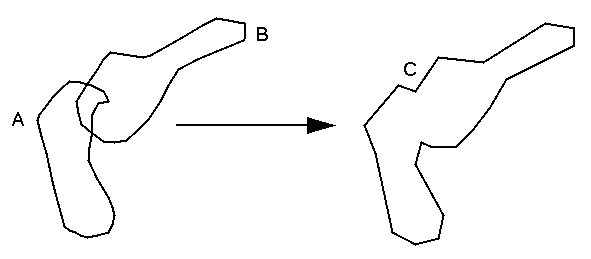
Exclusive Outersection or Union
Intersecting string = A
Intersected string = B
Operation = Exclusive outersection
That is, string A exclusively outersects string B and the resultant string is shown. Note that the order of defining the two strings is immaterial for the exclusive outersection operation as the result is always the same.
To explain some of the uses of polygon intersection some examples are given below.
Intersection
Imagine that the strings used for this example represent a range of mid-bench outlines for a designed pit (strings A) and a range of orebody outlines on corresponding levels for the same pit (strings B). The end result required is the volume of ore within the pit boundaries.
Intersection is generally used to determine the area which is common to two closed strings. By intersecting two closed strings we produce a string which has one or more segments which represent the area common to the two strings.
If we intersect strings B by strings A for each of the bench levels the result will be a range of files called strings C. Strings C represents the amount of ore on each bench level which is inside the designed pit boundary and the volume of ore within the pit can therefore be determined.
Outersection
Imagine that the strings used for this example represent a range of mid-bench outlines for a designed pit (strings A) and a range of orebody outlines on corresponding levels for the same pit (strings B). The end result required is the volume of one outside of the pit boundaries to determine what is being missed.
Outersection is generally used to determine the material which might remain after an excavation is completed, for example the excavation of an open pit.
If we outersect strings B by strings A for each of the bench levels the result will be a range of files called strings C. Strings C will represent the amount of ore on each bench level after the excavation has been performed.
Exclusive Outersection - Union
Imagine that the strings used in this example represent a range of mid-bench contours of a designed pit (strings A) and a range of mid-bench contours of another designed pit (strings B) which is beside the first pit in such a way that the two pits merge together. The end result required is a new range of strings which represent the shape of the two pits after they have been joined together.
Exclusive outersection is generally used to join two strings together to represent the total area of both strings and joining the strings together if necessary wherever they overlap.
If we exclusively outersect strings B by strings A for each of the bench levels the result will be a range of files called strings C. Strings C will represent the shape which results after both pits have been excavated.
From the File tools menu, select Intersect polygons to invoke the function.
Define the intersecting or outersecting polygons
Enter the Location, IDrange and String range to define the files and strings which will be used as the intersecting strings.
It is important to understand how matches are made between the strings and files which are used in the intersection process. There are two distinct cases which must be explained.
- When the intersecting layers consist of a single file which has multiple strings. In this case each of the specified strings are used individually to find the file with which the intersection process is to be performed. This is done by taking the Z value of the string and finding a file in the intersected layer which has this Z value as its ID number. The strings from this file are then recalled and used in the intersection process.
- When the intersecting layers consist of a range of files each of which has a single string. In this case a file which has an ID number which matches the ID number of the intersecting file is found, the strings are recalled from it and used in the intersecting process.
The end result is similar no matter which alternative is used. It is more for a matter of convenience as the first case is typically used when evaluating open pit designs as the output from the design process is a single file which has all the mid-bench level outlines for each bench within the pit design.
Therefore the rules which must apply to the entries which you make here are:
- If you enter an ID range for the intersecting layers then you must enter a single string number for the string range.
- If you enter a single ID number as the file ID range then you may enter a string range to define the intersecting strings.
Define the intersected or outersected polygons
Enter the Location of the files which are to be used as the intersected layers. See the previous discussion to understand how the ID numbers of the intersected files are determined.
Enter the range of strings which are to be restored from the intersected files and used in the intersection process.
Retain descriptions
Often numeric attribute data are stored in the description field of the intersected strings. This data generally represents the average grade of the material contained within the boundary of the string. If you respond with Y then the resultant strings will have the same description field contents as the intersected strings from which they originated. This makes it possible to determine the average grade of the contained material after intersection.
Define the output string files
The inputs made here will determine the results from this function.
Location
Enter the location which is to be used for the new files which are to be created. There will be one file created for each intersecting string.
Polygon operation
The response here will determine the type of intersection operation which will be performed. Valid responses are:
- I, perform the intersection operation
- O, perform the outersection operation
- X, perform the exclusive outersection or union operation.
Result
The result from this function will be a number of string files with the specified location. The number of files created is determined by the number of intersecting strings or files, see the discussion above for more details on this matter. Each file will contain strings which were defined as the intersected strings after the appropriate intersection operation has been performed.
It is perfectly acceptable for both the intersecting strings and the intersected strings to consist of multiple closed segments except in the case of performing the 'X' (union) of strings. In fact it is more common for this to be the case than otherwise.
Known Limitations
The exclusive outersection or union operation has difficulty if either the intersecting string or the intersected string has multiple segments. This will generally result in duplication of some of the original strings.
If the intersecting or intersected strings are common with each other considerable local ambiguities will result. To try and resolve these ambiguities the strings may expand or contract the string by a small amount. The amount of expansion or contraction will not exceed 0.001 units. If ambiguities still occur after this adjustment an error is reported. The only solution to this problem is to resolve the ambiguities before using this function.
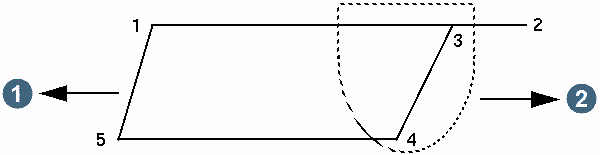
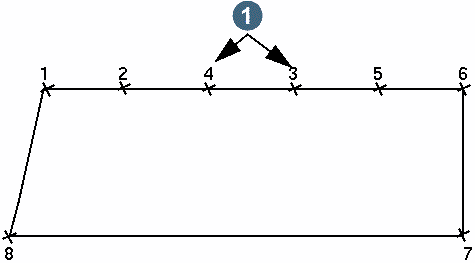
Strings which have foldbacks as in the following diagram have the potential to cause problems for the intersection process. The two diagrams below give examples of the type of problems to which this refers. The solution in the first case is to remove point 2 from the string and try again. The solution in the second case is to remove either point 3 or point 4 and try again.
|
1. intersected surface 2. intersecting surface |
|
1. remove either point |
Intersecting strings with anti-clockwise segments inside clockwise segments
The result produced when the strings being intersected have anti-clockwise segments contained inside clockwise segments is not quite what you might expect.
This is because of the difficulties inherent in a generalised polygon intersection algorithm. The result DOES NOT contain only those portions of the intersecting segment in the solid portion of the donut shapes.
The result does however include clockwise and anti-clockwise segments in such a fashion that the net area of all segments in the resultant string file reflects the nature of the embedded anti-clockwise segments.
Because of this, you can be confident that any volume reports produced with the result data are correct.
Messages
The shapes being intersected overlay each other ambiguously
Sometimes ambiguous situations arise which are difficult to resolve.
This problem of ambiguity may be resolved by altering the boundary string in one of two ways:
- Expanding or contracting by a small amount, or
- Shifting it in the X and/or Y direction by a small amount.
Generally 0.05 is sufficient.