


Check for common points
This function allows you to process string files to ensure adjoining shapes sharing common points touch exactly. Errors due to gaps or overlaps between digitized shapes can be eliminated with this function.
To run this function: Choose File tools > Check for common points, or...
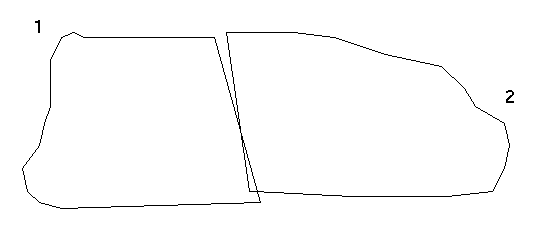
For example, when digitizing in two shapes with a common boundary, the following may result through digitising errors:
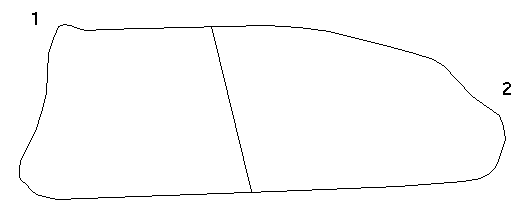
After running this file through Common Point Check and specifying a check distance greater than the digitising error gaps, the following will result:
 Note: This function does not delete points from string files.
It makes points which are within the specified check distance to be the same.
Note: This function does not delete points from string files.
It makes points which are within the specified check distance to be the same.
Define the input files
Define the input files to be processed by entering the Location, ID range and file type.
Retain descriptions
To retain the point description during processing.
The method for processing the strings is defined by the following:
String range
The range of strings which are to be compared in the common point checking process. There may be some strings in the file where there should be gaps and so only nominate those to be checked, i.e. 1,2 in the above example.
Check by (S)tr se(G) or (P)oint
The comparison to determine if points are common can be done by String, Segment or Point.
| String | If string is chosen then only points from different string numbers, in the given string range, are checked against each other. Points with the same string number are not compared with each other. |
| Segment | If segment is chosen then only points from separate segments are checked against each other. |
| Point | If point is chosen then all points in the given string range are checked against all other points in the range. |
(2) or (3) dimensional check
The comparison for common points may be done on the X, Y coordinates or the X, Y, Z coordinates. This is done by selecting a `2' or `3' dimensional check.
Check distance
The distance which is to be used in the common point check must be entered.
Define the output files
Define the files which are to be created by entering the Location. You should use a different location as it is very easy to destroy your data.
Result
New string files are created which contain strings or points modified by the criteria specified.