


Extrude and triangulate
You can use this function to quickly create closed or open trisolations of any segment by extrusion. To do so, you select a segment, then define some parameters for how a copy of that segment will be offset to a new position. Surpac then triangulates between the 2 segments and, optionally, inside each end segment.
To run this function: Choose Solids > Triangulate > Extrude and triangulate a segment, or Solids > Triangulate > Extrude and triangulate a string, or Solids > Triangulate > Extrude and triangulate a string range, or...
- In the Function Chooser, type EXTRUDE AND TRIANGULATE SEGMENT, and press ENTER.
- In the Function Chooser, type EXTRUDE AND TRIANGULATE STRING, and press ENTER.
- In the Function Chooser, type EXTRUDE AND TRIANGULATE STRING RANGE, and press ENTER.
The function successfully works on closed or open segments provided they contain more than two points. Segments containing fewer than three points are ignored.
 Fields on the
 | Field | Description |
|---|---|
| Object ID |
The ID of the object in which the trisolations are created. |
| Triangulate start segment |
|
| Triangulate end segment |
|
| Direction to copy segment |
There are two alternatives to determine how the selected segment will be copied for the triangulation process.
|
| Copy segment by |
The new segment that is created can be offset from the selected segment using six different techniques.
X offset The displacement in the X direction to determine the position of points in the new segment relative to the selected segment. Y offset The displacement in the Y direction to determine the position of points in the new segment relative to the selected segment. Z offset The displacement in the Z direction to determine the position of points in the new segment relative to the selected segment. Bearing Each point is projected along this bearing at the specified dip and horizontal distance. Horizontal distance Each point is projected by this distance Slope angle Each point is projected along this slope angle. Horizontal distance Each point is projected by this distance. Slope angle Each point is projected along this slope angle. Vertical distance Each point is projected by this distance. Slope angle Each point is projected along this slope angle. Distance Each point is projected by this distance. Slope angle Each point is projected along this slope angle. For this option, this angle is relative to the plane containing the segment.
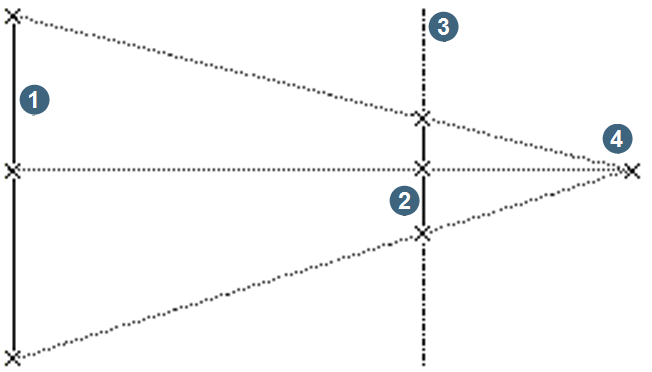
1 original segment Distance to vanishing point The distance at which all of the points of the original segment are shrunk to a single point. Distance to interpolation plane The distance between the original segment and the plane where the new segment is created. The closer the distance is to the vanishing point, the smaller the resulting segment. |
| Field | Description |
|---|---|
| Object ID |
The ID of the object in which the trisolations are created. The object and trisolation numbers used for each new trisolation are dependent on the Increment field. |
| Increment |
Whether the object or trisolation number is incremented.
|
| Triangulate start segment |
|
| Triangulate end segment |
|
| Direction to copy segment |
There are two alternatives to determine how the selected segment is copied for the triangulation process.
|
| Copy string by |
The new segment that is created may be offset from the selected segment using six different techniques.
X offset The displacement in the X direction to determine the position of points in the new segment relative to the selected segment. Y offset The displacement in the Y direction to determine the position of points in the new segment relative to the selected segment. Z offset The displacement in the Z direction to determine the position of points in the new segment relative to the selected segment. Bearing Each point is projected along this bearing at the specified dip and horizontal distance. Horizontal distance Each point is projected by this distance Slope angle Each point is projected along this slope angle. Horizontal distance Each point is projected by this distance. Slope angle Each point is projected along this slope angle. Vertical distance Each point is projected by this distance. Slope angle Each point is projected along this slope angle. Distance Each point is projected by this distance. Slope angle Each point is projected along this slope angle. For this option, this angle is relative to the plane containing the segment.
1 original segment Distance to vanishing point The distance at which all of the points of the segment are shrunk to a single point. Distance to interpolation plane The distance between the original segment and the plane where the new segment is created. The closer the distance is to the vanishing point, the smaller the resulting segment. |
| Field | Description |
|---|---|
| String range to extrude |
The strings to be extruded and triangulated. |
| Object ID |
The ID of the object in which the trisolations are created. The object and trisolation numbers used for each new trisolation are dependent on the Increment field. |
| Increment |
Whether the object or trisolation number is incremented.
|
| Triangulate start segment |
|
| Triangulate end segment |
|
| Direction to copy segment |
There are two alternatives to determine how the selected segment is copied for the triangulation process.
|
| Copy string range by |
The new segment that is created can be offset from the selected segment using six different techniques.
X offset The displacement in the X direction to determine the position of points in the new segment relative to the selected segment. Y offset The displacement in the Y direction to determine the position of points in the new segment relative to the selected segment. Z offset The displacement in the Z direction to determine the position of points in the new segment relative to the selected segment. Bearing Each point is projected along this bearing at the specified dip and horizontal distance. Horizontal distance Each point is projected by this distance Slope angle Each point is projected along this slope angle. Horizontal distance Each point is projected by this distance. Slope angle Each point is projected along this slope angle. Vertical distance Each point is projected by this distance. Slope angle Each point is projected along this slope angle. Distance Each point is projected by this distance. Slope angle Each point is projected along this slope angle. For this option, this angle is relative to the plane containing the segment.
1 original segment Distance to vanishing point The distance at which all of the points of the original segment are shrunk to a single point. Distance to interpolation plane The distance between the original segment and the plane where the new segment is created. The closer the distance is to the vanishing point, the smaller the resulting segment. |
Result
The selected segment, string or string range is copied as defined by the copy parameters and then triangulated creating a new trisolation of the specified object for each segment.
| If... | then... |
|---|---|
You see the message Warning: String 32000 segment 2 is self intersected. Segment ignored. |
check that you selected the segment or string you intended. If you select a complex string that has many points and many changes of direction, you could create intersecting trisolations. Conversely, if you select a simple string, such as a closed polygon you are very unlikely to create intersecting trisolations. |