


Validate for Export to Whittle
You should use this function before exporting a block model to Whittle. This function validates a Surpac block model so that you can export it to Whittle (as a .mod file). By validating the block model, you can identify logical errors in the block model (for example air blocks that have a positive grade). The validation step can save you time, and help you avoid potentially costly mistakes later when you are working on the model in Whittle.
This function scans every block in the Surpac block model, and tests each one for the conditions specified in the following 'fields on the form' table. If a block fails to meet a condition, the Error lookup attribute of the block is set to "WTLERROR". Any errors are reported only once in the Report file name, because all blocks could contain the same error, and the length of the report would become too long to be usable. Successful tests results are also reported.
Prerequisites: The block model must have attributes for sg, rock, and grade of the resource. Air blocks must have a specific value, for the rock attribute, to indicate that they are air. Waste blocks must have a specific value, for the rock attribute, to indicate that they are waste.
To run this function: In the Function Chooser, type BM VALIDATE FOR WHITTLE OUTPUT, and press ENTER.
If a block model is not already open, you are prompted to open a block model.
Fields on the Validate for export to Whittle form
| Field | Description |
|---|---|
| Indicator Kriged |
|
| Rock code attribute | The attribute that contains an alphanumeric rock code for each block. Rock codes must have at least 1, and no more than 4, characters. An example Rock code attribute is rock. |
| SG attribute | The attribute which contains the specific gravity, that is density, value for each block. The SG attribute must have a data type of real, and its value must be 0 or higher. An example SG attribute is sg |
| MCAF attribute |
The attribute that contains a Mining Cost Adjustment Factor (MCAF) for each block. The MCAF attribute must have a data type of real, and its value must be greater than 0. An example MCAF attribute is mcaf.
|
| PCAF attribute |
The attribute that contains a Processing Cost Adjustment Factor (PCAF) for each block. The PCAF attribute must have a data type of real, and its value must be greater than 0. An example PCAF attribute is pcaf.
|
| Volume adjustment |
The attribute for volume adjustment factor. The Volume adjustment attribute must have a data type of real, and its value must be between 0 and 1. Volume adjustment is optional. You use the Volume adjustment attribute to modify the ore tonnes in a block, but NOT the total block tonnes. Volume adjustment is a factor less than one, for example 0.8 not 80%. If the block has 100t @ 2 g/t, without the volume adjustment the ore parcel contains 100t @ 2 g/t for 200g. If the volume adjustment was 0.5, then the total block tonnes remain 100t while the parcel contains 50t @ 2 g/t for 100g. |
| Waste rock code | The rock code that defines "undefined" waste. Only the first 4 characters are used. An example Waste rock code is WAST. |
| Air rock code | The rock code that identifies a block that is air. An example value is AIR. |
| Zone attribute | The attribute that contains the rock type number. The Zone attribute must have a data type of integer, and its value must be greater than 0. This field is optional. |
| Grade attribute | The attribute, or attributes, that contain the grade for each block. Grade values must be 0 or higher. |
| Export Block Size |
The block size you intend to use when you export the block model to Whittle. BM VALIDATE FOR WHITTLE OUTPUTS checks whether there will be more than 999 parcels (that is, sub-blocks) in any block at the Export Block Size. This check is important because you can have no more than 999 parcels in a block in Whittle. Additional sub-blocks would be removed when you export to Whittle, and so you could lose ore. |
| Constrain Model |
|
| Error lookup attribute |
The attribute that will contain the error code if validation fails. If you type the name of an attribute that does not yet exist, you will create the new attribute.
|
| Report file name | The name of the report file to output. The text file contains a report of the successful tests and the failed tests. |
 Note: BM VALIDATE FOR WHITTLE OUTPUT overwrites any existing values for the
 Output
A report file is created that shows which validation tests passed and which failed. If any validation errors occurred, the blocks where the errors occurred have the Error lookup attribute set to WTLERROR.
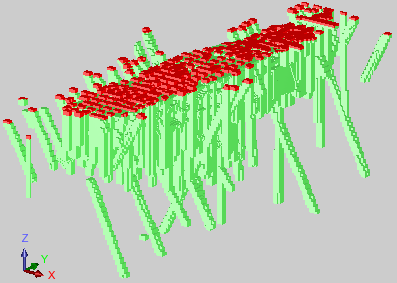
 Tip: To see the error blocks in Graphics, display the block model, and colour by the Error lookup attribute. You might need to apply a constraint to hide less important blocks that are obscuring the view, for example by constraining where the rock attribute does not equal waste.
The following image shows the result of running BM VALIDATE FOR WHITTLE OUTPUT on a block model where most validation tests passed but some air blocks do not have an sg value of zero, and some air blocks have a grade value greater than zero. The block model is displayed, and then constrained to hide the waste blocks, and coloured by the Error lookup attribute. The blocks that have an Error lookup attribute value of WTLERROR are displayed in red.
Note: This function also tests whether the Surpac block model has more than 999 999 blocks in any direction.