


Edit charge
Edit charge with a hole containing a single charge
To run this function: Choose Design > Ring design > Charging > Edit charge, or...
Select and drag charge to the new position
Select the charge segment to edit by pressing and holding the left mouse button down. Either end of a charge segment may be relocated.
With the left button still down, drag the charge end point to the new position along the drill hole. As the endpoint is dragged, the new length of the charge is displayed half way along the charge segment. If the Critical Radius charging algorithm is enabled, the status of the charge in relation to the adjacent charged holes is displayed half way between the two holes’ collars. If this charge has violated the critical radius of the next charged hole, the amount that the hole has compromised the adjacent hole’s Critical Radius is displayed in red. If the Critical Radius has not been violated, offset distance is displayed in a default colour (see diagrams below).
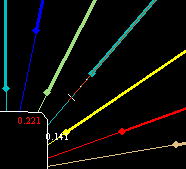
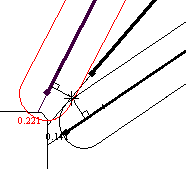
Release the mouse button when satisfied with the location of the end point. The charge segment will be extended or contracted to the newly selected location.
If the Charge is edited in such a way that the charge length is reduced to a length shorter than the minimum charge length, than the Charge Length Too Short form will be displayed.
Set to minimum length
Select this check box to increase the charge length to the minimum allowed charge length. The selected end point will be moved to increase the size of the charge length.
Delete Charge
Select this check box to remove the charge from this hole.
Reset Charge
Select this check box to leave the end point at the same position where it was located before the charge was edited.
The Edit Charge function continues until Cancel is chosen.
Edit charge with holes containing multiple charges
Run the EDIT CHARGE function to display the prompt:
Select and drag charge to the new position
Select the charge segment to edit by pressing and holding the left mouse button down. Since there are (possibly) multiple charge segments for each hole, any of these charges can be edited. If an endpoint is shared by more than one charge, then both charges sharing the endpoint will be resized. Each charge may still be resized at either end.
The dragging of the charge end point will be restricted so that it may not be dragged beyond the end point of the adjacent charge. As the endpoint is dragged, the new length of each charge affected is displayed half way along the charge segment. The Critical Radius offset will now be calculated for all Charges in the selected hole and all charges in the adjacent hole.
If either charge is reduced to a length smaller than the minimum charge length, the Charge Length Too Short form will again be displayed. The action taken for a hole with multiple charges differs from that of a hole with only a single charge.
Set to minimum length
Selecting this check box will increase the length of the charge that is too short, in the process shortening the length of the other charge.
Delete Charge
Selecting this check box will cause the Charge segment to be reduced to a length of zero. If all the charges in the hole have zero charge length, then the hole will have all charge segments cleared.
Reset Charge
This option functions the same as for a single charge, all charges will be left unaltered.
The Edit Charge function continues until Cancel is chosen.
Errors
This function requires an existing hole
No holes are present on the current rig.
Can not verify which drive or stopes the holes are to be associated with.
			Reselect a new rig position.
Most likely cause for this message is that another ring design function has removed the rig from the current ring. Use the Rig Position function to reselect the rig position.
There are no charged holes on the current ring
Error message. The current ring does not have any charged holes. Holes first need to be drilled and charged before this function can be used.
The charge length is shorter than the minimum allowed charge length.
			Hole will be uncharged if left at this length.
Warning message. The hole is shorter than the minimum charge length. The minimum charge length can be adjusted using the Charging Parameters form.