Clip blast boundary by crest string
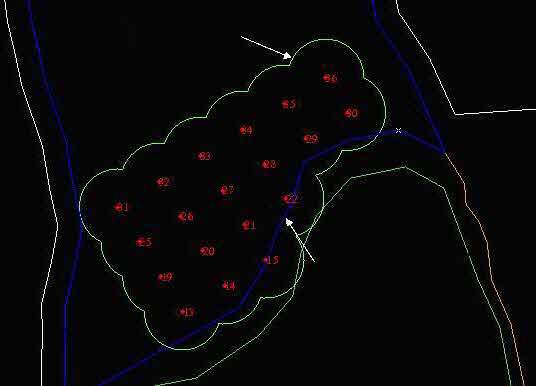
The CREATE BLAST BOUNDARY STRING function will sometimes create a string that extends beyond the crest string of the bench from which the blast holes are drilled. This function permits you to trim the blast boundary string by the bench crest string.
To run this function: Choose Design > Blast design > Blast design > Clip blast boundary by crest string, or...
Select the crest string
Position the pointer and select a point on the crest segment which is to be used as the boundary to trim the blast boundary string.
Select the blast boundary string
Position the pointer and select a point on the blast boundary string which is to be trimmed.
 Note: This segment must be in the active layer.
Select a point which lies on a part of the blast boundary to retain.
Select a point on the boundary string to define the side of the boundary segment to be retained. The portion of the blast boundary string extending beyond the crest string, on the opposite side to that selected, will be clipped from the blast boundary string and the screen updated accordingly. The following image shows the blast boundary in white around the red blast holes, and the crest string in blue.