


Create a blast solid
This function is used to create a solid that represents the volume of material to be blasted, given the true blast boundary string generated from the output of the function BLAST TRUE BOUNDARY. Optionally when creating the blast solid it can be clipped to a crest and toe string if an open face intersects the blast solid. The resulting blast solid is named blast_solid_layer which is used by the blast reporting functions.
To run this function: Choose Design > Blast design > Blast design > Create a blast solid, or...
Note that if you are providing a surface to be used for the top or bottom of the blast solid then it must be a valid surface that has been created with the Surpac DTM functions. If the function fails to generate a valid blast solid then you may need to reduce the number of points in the blast boundary string.
Blast solid form
Output layer
Specify the layer that the blast solid will be created in.
Blast pattern
Specify the blast pattern that has been used to generate the true blast boundary. If a blast database is loaded then the blast patterns from the collar table will be used to populate the combo box, otherwise the blast pattern must be typed in manually. The blast pattern is required when naming blast solid, which is then subsequently used in blast reports.
Rock mass classification
The rock mass classification ,RMC, is simply a rock code that is entered into the blasting defaults table and if set up can be used to automatically retrieve information in other parts of the blasting module. Polygon string files can be used to define specific areas for each rock type/RMC code.
If rock mass classification codes are being used and are set up, then specify the rock mass classification that was used to generate the blast pattern and blast boundary, otherwise leave it blank or choose “RMC not available” from the drop-down list. A list of available RMC values from the blast defaults is used to populate the drop-down combo box.
The RMC and blast pattern identifier selected are used to name the blast solid. The RMC information stored in the blast solid name is then is then used to automatically retrieve information, such as rock sg and drilling costs, from the blasting defaults table when producing blast reports.
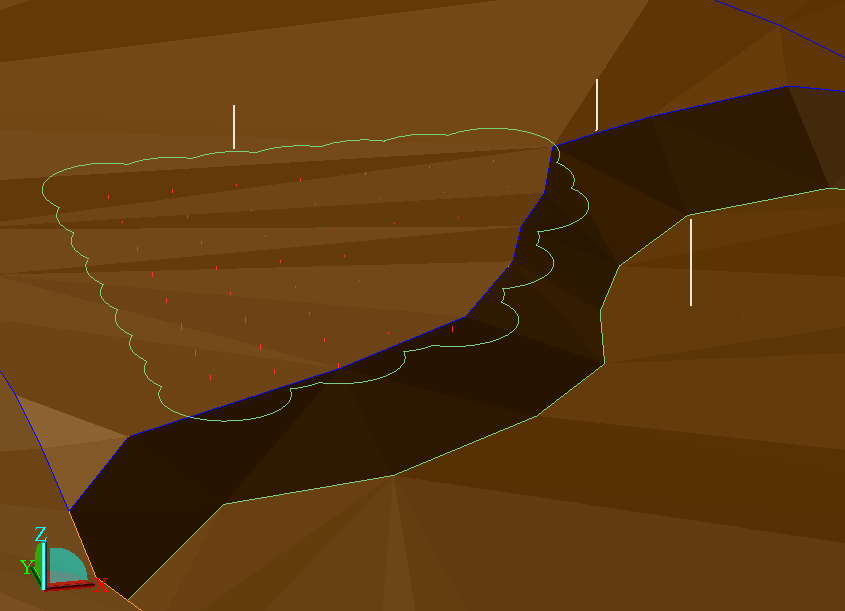
Trim blast solid to a free face?
Select this option if there is a bench face that intersects with the blast solid and you want the blast solid to be clipped against it.
When the form is applied you will be prompted to select the crest string and toe string of the intersecting face.
If the toe string does not intersect with the true blast boundary when it is projected down to the blast floor then you can press the ESC key so that the toe of the face is not clipped against anything.
The following example shows a true blast boundary which intersects with the bench face. The following image shows a blue crest string intersecting a green blast boundary string, and below those two strings the image shows a green toe string. A white line points to each string.
Top surface
The top surface of the blast solid can be specified either by a fixed elevation, a DTM layer or a DTM file. In the case of the fixed elevation the true blast boundary will be used to create the top surface.
Use boundary elevation?
If you are specifying a fixed elevation for the top surface of the DTM then you have the option of providing a fixed elevation or to use elevation of the blast boundary string selected.
Bottom surface
The bottom of the blast solid can be specified either by a fixed elevation, a DTM layer or a DTM file.