


Menus
Menus are the primary means to activate a function. A menu consists of a menu title and one or more menu items. To select a menu item, use the mouse to place the pointer over the menu item, and click the left mouse button. This is called running a function or invoking a function.
 Tip: Another way to run a function is to type its function name in the Function Chooser, at the bottom of the Surpac main window, and press ENTER.
Some of the menus available in Surpac are: File, Edit, View, and Insert.
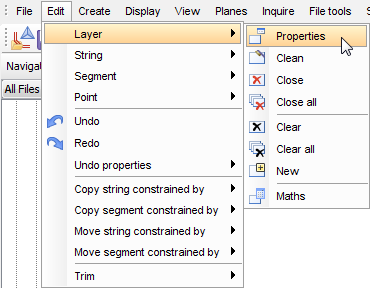
All the menu items are listed in the help under Menu Commands in the Table of Contents.
There are three types of items on menus. These are:
| Item Type | Item Purpose |
|---|---|
| Submenu | A submenu item is identified by a small triangle at the right hand edge of the item. When you click this type of item, (or hover the mouse over the item) a new menu is displayed. Submenu items do not run functions themselves, but they provide a way to arrange functions logically so that they are easy to find in the menu structure. |
| Function | A function button performs the following:
|
| Separators | These items do not do anything. Their purpose is to make the menus easier to read. |