


Layer Manager
You can view and interact with all layers in the Surpac Work Area with the Layer Manager.
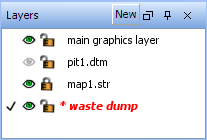
The Layer Manager displays many layer properties:
|
Layer Properties |
|
|---|---|

|
Active layer |

|
Visible |

|
Not visible |

|
Selectable |

|
Not selectable |

|
Modified |

|
Not modified |
You can perform the following operations with the Layer Manager:
|
To |
right-click the layer name, and then select |
|---|---|
| Set the active layer |
Make active
click the white space to the left of the layer status icons to set the active layer. |
| Control layer visibility |
Visible, or
|
| Control layer selectability |
Selectable
|
| Control DTM face visibility | Faces visible |
| Control DTM edge visibility | Edges visible |
| Control DTM colour interpolation | Colour interpolation |
| Display DTM triangles with sharp edges | No shading |
| Smooth DTM triangles | Smooth shading |
| Smooth DTM triangles accurately | Accurate smooth shading |
| Clean the data | Clean layer |
| Perform maths functions | Layer maths |
| Create a DTM | Create DTM |
| Save data in a layer | Save layer |
| Delete a layer | Delete layer |
 Tip: You can also double-click the layer name, or
To create a new layer:
- Click the New button.
- Enter a name.
- Click Apply.