Create Variable Grid
This function will create one or more string files which contain string segments which represent the extents of some grid cells which may have variable spacing in the X and Y directions.
This function is usually used in conjunction with the Create Nodes From Variable Grid function for creating grid node points for use with various groundwater modelling programs, notably FLOW3D and MOC, however it provides a useful utility which will create a pattern of row and column strings for plotting grid layouts on a plan.
To run this function: Choose File tools > Grid tools > Create variable grid, or...
Define the files to create
Enter the Location and ID range of the files which are to be created. On file is created for each ID number entered and the Z value of the strings in a file will match the ID number of the file.
Y range
Enter the range of Y values at which the row strings are to be created. By using a range it is possible to have either a fixed spacing between rows or variable spacing between the rows.
X range
Enter the range of X values at which the column strings are to be created. By using a range it is possible to have either a fixed spacing between columns or variable spacing between the columns.
Y string number, X string number
Enter the string numbers which are to be used for the row and column strings. You may use the same string number for rows and columns although this is not recommended as the Create Nodes From Variable Grid function cannot work correctly if this is the case.
Result
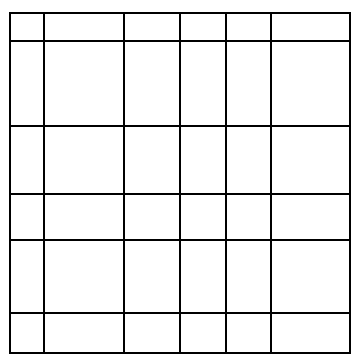
The string files specified by the ID range are created. The row and columns are represented by different segments of the string numbers specified and each segment consists of only 2 points.
The segments of each of the strings are in order of increasing X or Y value as this is a requirement of the Create Nodes From Variable Grid function.
Below is an example of the row and column strings which can be created using this function.