


Zoom in
This function allows you to enlarge the data displayed by the zoom factor.
To run this function: Choose View > Zoom > Zoom in, or...
The view is magnified by the zoom factor.
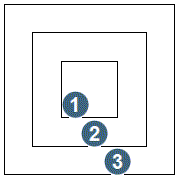
|
1. 2x 2. 4x 3. 8x |
Zoom Out
This function allows you to reduce the view by the zoom factor.
To run this function: Choose View > Zoom > Zoom out, or...
The view is reduced by the zoom factor.
Zoom All
This function allows you to rescale the screen extents to include all of the data in either the active layer or in all layers. The result is dependent on the Rescale SETTING.
To run this function: Choose View > Zoom > Zoom all, or...
The view is altered according to the Rescale SETTING.
 Note: When Zoom All is invoked the view is changed to plan view.