


Light on
Function Name(s) :
This function allows you to artificially illuminate the data displayed on the screen. Surface rendering and shading will be applied to triobjects (DTMs) which have been drawn and strings which have been drawn as polygons. This adds another level of complexity to the viewing system and can add some time to the process of re-displaying a new view but the result achieved is generally worth it.
Up to three light sources may be inserted into the view, each of which illuminates with a specified colour from a specified direction. The source distance is considered to be at infinity so that the light rays are parallel. The position of the lights is defined as a vector rather than an absolute position. For example the vector of Y=0, X=0, and Z=1 defines illumination from directly above the data.
Fields on the DEFINE LIGHTS BY VECTORS AND COLOURS form.
Y
Define the Y component of the vector to the light source.
X
Define the X component of the vector to the light source.
Z
Define the Z component of the vector to the light source.
Colour
Define the colour for the light source. Colour names may be simple names, for example `red', `green', `blue' or complex names, for example `light green', `dark red', `greenish blue'.
Lighting Interpolation
Any objects which have been drawn using the DRAW SHELLS function will respond to different types of lighting interpolation. Lighting interpolation is an advanced rendering option which enhances the presentation of images.
Valid entries are:
- N, No lighting interpolation. The colour of a triangle face is fixed for the entire triangle face.
- G, Gouraud shading. This is a technique which is used to vary the colour across the triangle faces. This is done by determining the colour at each vertex and then interpolating this colour across the triangle.
- P, Phong shading. This is a technique similar to Gouraud shading which is used to vary the colour across the triangle faces. It generally more realistic results at the expense of increased processing time.
Both Gouraud and Phong shading tend to smooth the rough edges from objects and give a far superior graphic presentation of the data. Often Gouraud shading is implemented in hardware thus making it even faster than Phong.
Edge Lighting
Any objects which have been drawn using the DRAW SHELLS function can have lighting applied to just the faces or to both the faces and edges.
Valid entries are:
- N, No edge lighting. Only faces will be shaded as lit. Edges will appear the same as if unlit.
- Y, Edge lighting. Lighting will apply to edges as well as faces.
Result
If the picture contains polygons or triobjects (DTMs) and the face attribute is on then the view will alter to show the surface shading effects of the defined illumination sources.
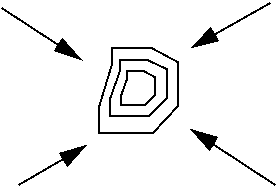
The diagram below shows an example of light source directions defined by vectors, where the light source is from above the surface as indicated by Z=1.
Light Off
Function:
Removes any illumination which may have been inserted into the view and return the picture to its un-illuminated state.
Illumination is turned off and the display is changed accordingly.