


Clip by box
This function clips segments which lie inside or outside a box that you create. That is, it deletes all the points of all the segments that are inside or outside the box, and, to make each segment end at the boundary of the box, it creates new points along the boundary of the box.
Prerequisites: Your view in Graphics is within 5% of Plan, Section, or Long section view, or the active plane (which can be an inclined plane).
To run this function: Choose Edit > Trim > Clip by window box, or...
Fields on the Select and clip form
| Field | Description |
|---|---|
| Clip segments |
|
You are prompted to drag a boundary box.
 Notes:
- Only the segments which are within the active layer are affected.
- In Default preferences, the Window In Mode setting determines the way in which you define the boundary box in Graphics.
 Messages
Output
The data you selected to clip is clipped against the boundary and the Select and clip form is redisplayed.
Note: Only the segments which are within the active layer are clipped.
Clip by segment
This function clips segments are lie inside or outside a closed segment that you select.
Prerequisites: Your view in Graphics is within 5% of Plan, Section, or Long section view, or the active plane (which can be an inclined plane). A closed segment is displayed that you will use as a boundary string.
To run this function: Choose Edit > Trim > Clip by selected segment, or...
Fields on the Select and clip form
| Field | Description |
|---|---|
| Clip segments |
|
You are prompted to select a closed segment that is displayed in Graphics.
Output
The data you selected to clip is clipped against the boundary and the Select and clip form is redisplayed.
Note: Only the segments which are within the active layer are clipped.
Clip by temp segment
This function clips segments which are inside or outside a temporary boundary that you create.
Prerequisites: Your view in Graphics is within 5% of Plan, Section, or Long section view, or the active plane (which can be an inclined plane).
To run this function: Choose Edit > Trim > Clip by digitised segment, or...
Fields on the Select and clip form
| Field | Description |
|---|---|
| Clip segments |
|
You are prompted to digitise a temporary boundary string. To create the segment click the first two points then each subsequent point you click expands the closed segment. Press ESC to finish selecting points.
Output
The data you selected to clip is clipped against the boundary, and the Select and clip form is redisplayed.
Clipping Points
The CLIP BY TEMP SEGMENT, CLIP BY SEGMENT and CLIP BY BOX functions take note of the drawing method that is used to determine how strings and segments are drawn. Strings that have no line style defined in the drawing method are treated as points or spot heights. In this case, the bounding segment only clips the points. No points are created where the string and the bounding segment intersect.
Special Considerations
The rounding of coordinates to three decimal places when saving points to string files can sometimes cause problems with the locations of points relative to the string.
This sometimes results in points being located marginally (<0.002) on the wrong side of the boundary string. If this data is subsequently merged with the original boundary string, and used in the Create DTM function, spurious break line intersections may occur.
To overcome this, the boundary string is modified (transparently and temporarily for the duration of the Clip function only) by expanding or contracting each closed segment of the boundary string by an offset distance of 0.01. This ensures that spurious intersections will never occur.
The result of this adjustment is that strings which have been clipped to a boundary will never come closer than 0.01 to the boundary string.
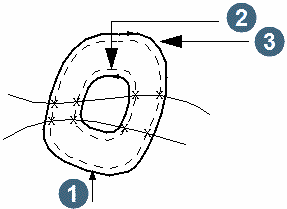
| Extraction Type | Boundary String Direction | Modification |
| Inside | Clockwise | Contracted |
| Inside | Anti-clockwise | Expanded |
| Outside | Clockwise | Contracted |
| Outside | Anti-clockwise | Expanded |