


Trend Analysis
You can use this function to calculate basic statistical parameters for one or more Surpac string files.
To run this function: Choose Block model > Geostatistics > Trend analysis, or...
Data string files for this module may come from any source. There must be a minimum of 4 samples after constraints have been applied to calculate the Median Absolute Deviation (MAD). If there are less than 4 samples, "Not calculated" appears in the report.
Typically the data points have 3D coordinate positions (which may be used to constrain the selection of data to be used), however this is not essential because the distributions and statistics are calculated on the contents of one or more of the description fields within the string file, for example D1 or D2.
The physical location of the data points with respect to each other is not taken into account, and the results should be interpreted accordingly. For instance, frequency distributions may be meaningless if drill hole data points are located on a 10 metre grid in the high grade area and on a 100 metre grid in the lower grade areas. It is also important that the data to be processed is of a constant support size.
Procedure
- Choose Geostatistics > Trend Analysis.
 Main tab on the Trend Analysis form.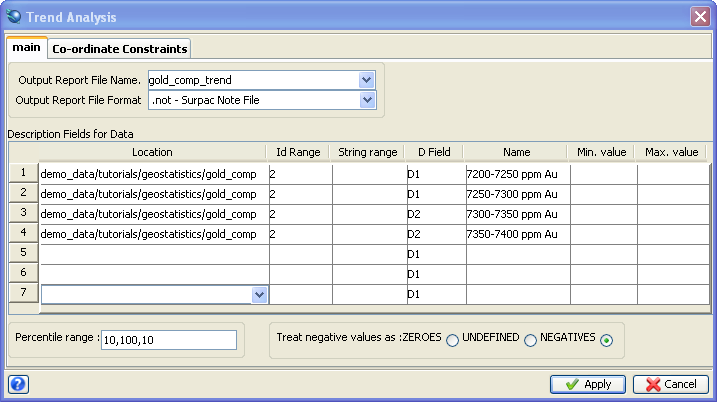
If you wish to constrain the data by coordinates, click the Co-ordinate Constraints tab.
Co-ordinate Constraints tab on the Trend Analysis form.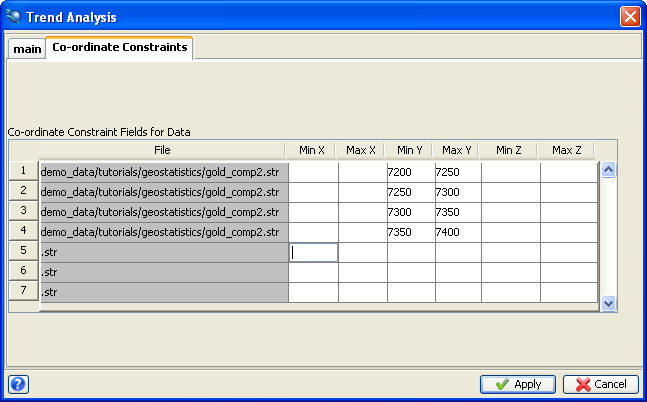
- Fill in the fields on the Trend Analysis form.
- Click Apply.