

Convert grid surface to DTM
You can use this function to convert a Minex grid file (.grid) to a .dtm.
In Minex, a grid file is used to represent a physical surface or to represent important measurements. For some examples, a Minex grid can be used to represent:
- a seam floor
- the depth of a seam below the surface
- the sulphur content of a seam
Prerequisites: For this function to be useful, at least one Minex grid is open in Graphics.
 Note: To open a Minex grid, drag it into Graphics.
To run this function: Choose Surfaces > Convert grid surfaces to DTMs, or...
Fields on the Convert grid surfaces to DTMs form
| Field | Description |
|---|---|
| Layer | The layer from which to pick a grid. You can choose All layers. |
| Grid surface | The grid you want to convert. You can choose All grids. |
When you click Apply, the Convert a grid surface to a DTM form is displayed.
Fields on the Convert a grid surface to a DTM form
| Field | Description |
|---|---|
| Output triobject | The ID of the first triobject to create. |
| Output trisolation | The ID of the first trisolation to create. |
| Action for converted grids |
|
| Create new surfaces as distinct |
|
| Output the surface to |
|
| Output layer | The name of the layer in which the DTM is created. This field is available only if Output the surface is set to New layer. |
Output
The grid is displayed in Graphics as a DTM. It appears either in the active layer, or in a new layer, depending on the Output the surface to option.
Note: The DTM is not saved when it is created. If you want to keep a copy of the DTM, you must save it.
The following image shows several Minex grids, each representing one seam floor, and one grid, representing topography, dragged into Graphics, and then converted to a single DTM, with new surfaces created as distinct triobjects.
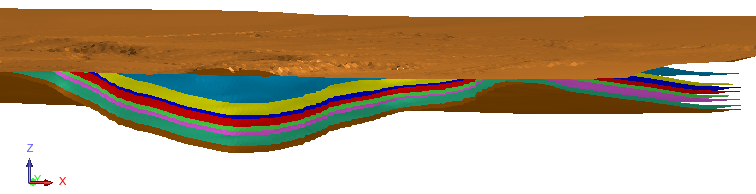
 Tip: If you want to use individual surfaces to calculate volume of material above each surface, create the seams as separate DTMs.