


Contour annotate
Function Name:
If you want more or fewer annotations than produced automatically in the Contour Extract function when extracting contours for plotting, this function allows you to generate a new file of annotations for any existing contour file.
Define the contours to be annotated
Location, ID range, Contour range
Identify the existing contours for which you wish to generate annotations by entering the Location, ID range and Contour range of the contour strings.
Annotation Interval
The number and separation of annotations on each contour is referred to as the frequency. It is specified as a distance, in real world measure, between annotation points along each string. The annotation will be placed in the segment of the string in which the measured distance to an annotation point falls. An annotation is always written for the first segment of each string to guarantee at least one annotation per contour.
Define the annotation file to create
Location and ID number
Enter the Location and ID number of the string file which is to contain the annotation strings.
Plotting Contour Annotations
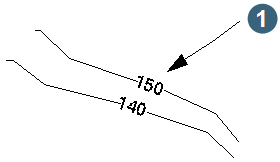
Contour annotation files contain 'pairs of points' being the beginning and end points for line segments along which annotations can be written. The actual annotation value is the description field of the second point of each pair of points. This makes it possible to plot the annotations along the contours string. For example,
|
1. annotation plotted at a relative angle of zero to the line segment, at a percentage distance of 50% backwards from the nominated point. |
There is an entity in the plot entity library called `CONTOUR LABEL' which will produce labelling in this way.