


Extract Vertical Sections for Calculations
With this function you can extract drill hole sections from a database into string files for grade calculations. The sections may be of any vertical orientation and are defined by specifying the end points of the first section plane and the projection distances either side of the section plane. Only those samples that fall inside the defined limits will be extracted for grade calculations. Multiple sections can be extracted at one time by nominating a range of section numbers. All samples that meet the selection criteria will be output to a separate string file for each section.
To run this function: Choose Database > Extract > Sections for calculations, or...
Location of string files
Enter the location name for the string files that will be generated.
Section Range
Enter the range of sections that you wish to extract. The values that you enter for the section range depend upon the orientation of the sectionline. There are three distinct cases which must be considered when defining the section orientation and the associated section range. These are:
- The section orientation is East-West and you are looking to the North. This is arranged by the left end of the section line being the western most of the section line endpoints.
- The section orientation is North-South and you are looking to the West. This is arranged by the left end of the section line being the southern most of the section line endpoints.
- The section orientation is something other than the two cases described above. That is, oblique to the principal axes, or East-West in orientation and looking South, or North-South in orientation and looking East.
In this case the values entered for the section range must be Northing values.
In this case the values entered for the section range must be Easting values.
In each of these cases the values entered for the section range must be perpendicular distances from the line defined by the section endpoints to each of the subsequent section lines required. Therefore to obtain a section centred about the line defined by the section endpoints, a value of 0 (zero) must be included in the section range.
If five sections are required at intervals of 50 metres from the section line then a range of '0,200,50' must be used.
The range will control the ID numbers assigned to the output string files, with the first section generated having an ID number taken from the `From' part of the range statement, with subsequent sections having an ID number taken from the `From' part of the range statement plus the `Increment' of the range statement. The `Increment' will also control the distance at which subsequent sections are offset from the initial section end-points.
Define the section orientation
Left end
Enter the coordinates of the left end of the section line.
Right end
Enter the coordinates of the right end of the section line.
Define the section extents
Widths
Enter the projection distance either side of the section plane. The first distance is the distance extending back from the section plane, i.e. extending south for an east-west section, or east from a north-south section. The second distance is the distance extending forward from the section plane.
Z extents
Enter the minimum and maximum elevations for the volume in space in which the drill holes are to be extracted.
Real world coords for oblique sections
If oblique sections are defined, then the output strings can be stored in real world coordinates or coordinates relative to the defined oblique section. In the latter case the eastings in the string file will be relative to the most westerly or southerly point on the section which will have an easting of zero. The northing will be the distance from the first defined section as in the diagram above. The z coordinate will have the correct elevations.
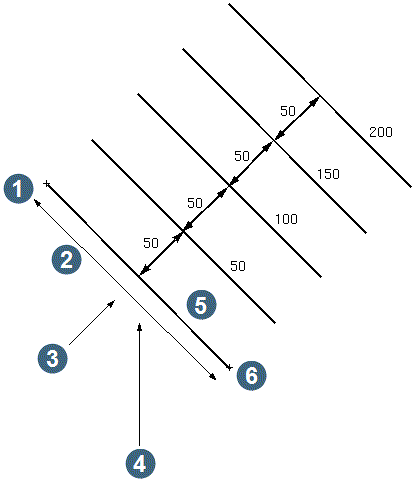
|
1. y1, x1 2. length 3. view if relative to section 4. view if real world coordinates specified 5. section 0 6. y2, x2 |
Sample Table
Enter the name of the interval sample table that you wish to use to extract data for grade calculations.
Choose Apply from the EXTRACT SECTIONS FOR GRADE CALCULATIONS form to display the DEFINE SAMPLE FIELDS form.
Table
The Table name is displayed here.
Field name
Enter the names of the sample fields that you wish to extract for grade calculations. Up to twenty fields can be extracted at one time.
Complete the DEFINE THE SAMPLE FIELDS form and choose Apply to display the DEFINE QUERY CONSTRAINTS form. See Selecting Data To Be Processed.
Complete the DEFINE QUERY CONSTRAINTS form and choose Apply to commence the processing of the data, and return to the EXTRACTING STRINGS submenu.
Messages
Upon completion, the names of the output string files will be displayed in the message window. The output from Vertical Sections for Calculations is a string file for each section selected, with a location name you supplied and an ID number equal to the value of each section selected. Each drill hole which meets the selection criteria will be stored in a separate string number in the output file, starting with string number one. The entire hole trace within the extraction criteria will be stored in the output file, along with each selected sample stored in the D field of each string. The actual data point stored for each of these strings represents the end point of the selected sample.
Further Processing
The main purpose of this function is to extract information from the database into string files for interval weighted average grade calculations.