


Restore last section
This function reinstates the last specified section for the current session of Surpac. If no previous sections have been defined in this session, you will need to select Specify current section to define a section of interest.
To run this function: Choose Database > Sections > Restore last section, or...
Digitised segment grade
This function allows you to specify a number of database fields or block model attributes for which you would like to calculate composited values.
Prerequisites: A closed polygon is displayed. If you want to use drillhole data, a geological database must be open. If you want to use block model data, a block model must be open, and you must activate a slicing plane with the Section Block Model check box selected.
To run this function: Choose Database > Sections > Digitised segment grade, or...
Fields on the Digitised segment grade form
Database tab
Composite method
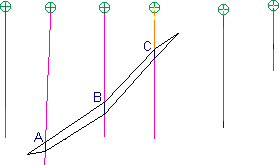
Select length weighted if you want the segment grade to be calculated as the length weighted average of the sample intervals intersecting the selected segment (eg. a length weighted average of intervals A, B and C in the diagram below). This is useful for calculating the grade of a geologically constrained area.
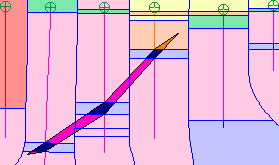
Select area weighted to calculate segment grade as a polygonal (area weighted) composite of the drillhole samples with an area of influence (ie. the region of space closer to that sample than to any other sample) overlapping the selected segment (eg. the area weighted average of the darkly coloured regions in the diagram below). This is useful for calculating the grade of a segment that doesn't intersect a drillhole or to remove the effect of drillhole "clustering". Where drillholes cross, common sample positions will be given the average grade of the two or more samples at the same location.
Minimum % of sample to be included
If more than the specified % of a sample is on section then the sample is considered to be on section.
Table
Select the database table containing the field of interest.
Field
Select the field to be composited.
Dilute
If there are gaps or negative assay values in the samples along the drill hole trace, you must decide how to treat them. If this checkbox is checked the composited grade is diluted by assuming a value of zero for the blank or negative samples.
If this checkbox is left unchecked, the missing or negative samples are completely ignored and the composited grade is not affected.
D Field
Each composited value can be written to a description field of every point in the segment. Select a description field to save the result or leave the field blank if you do not wish to save the result to a description field.
Block model tab
Block attribute values can also be composited. The value of each block will be weighted by the area of the block that is inside the selected segment or string.
Attribute
Select the attribute to be composited.
Dilute
If the segment includes area not covered by a block model block or there are negative assay values in the blocks, you must decide how to treat them. If this checkbox is checked the composited grade is diluted by assuming a value of zero for the areas without grade information or negative samples.
If this checkbox is left unchecked, negative samples are completely ignored and the composited grade is not affected.
D Field
Each composited value can be written to a description field of every point in the segment. Select a description field to save the result or leave the field blank if you do not wish to save the result to a description field.
Apply the form to display the prompt: Select the segment of interest
Select the segment inside which the composite values are to be calculated.
Output
A message is displayed reporting the string and segment numbers, segment area and the composited values. If you selected a D field in the form, the composited value is written to the D field.
 Tip: If you select a D field on the Database tab and a different D field on the Block Model tab, you will write two composited values to different D fields (one calculated from drillholes, and the other calculated from the block model).
See also
Digitised string grade
This function allows you to specify a number of database fields and/or block model attributes for which you would like composited values calculated.
Prerequisites: A closed polygon is displayed. If you want to use drillhole data, a geological database must be open. If you want to use block model data, a block model must be open, and you must activate a slicing plane with the Section Block Model check box selected.
To run this function: Choose Database > Sections > Digitised string grade, or...
Fields on the Digitised string grade form.
Database tab
Composite method
Select length weighted if you want the segment grade to be calculated as the length weighted average of the sample intervals intersecting the selected segment (eg. a length weighted average of intervals A, B and C in the diagram below). This is useful for calculating the grade of a geologically constrained area.
Select area weighted to calculate segment grade as a polygonal (area weighted) composite of the drillhole samples with an area of influence (ie. the region of space closer to that sample than to any other sample) overlapping the selected segment (eg. the area weighted average of the darkly coloured regions in the diagram below). This is useful for calculating the grade of a segment that doesn't intersect a drillhole or to remove the effect of drillhole "clustering". Where drillholes cross, common sample positions will be given the average grade of the two or more samples at the same location.
Minimum % of sample to be included
If more than the specified % of a sample is on section then the sample is considered to be on section.
Table
Select the database table containing the field of interest.
Field
Select the field to be composited.
Dilute
If there are gaps or negative assay values in the samples along the drill hole trace, you must decide how to treat them. If this checkbox is checked the composited grade is diluted by assuming a value of zero for the blank or negative samples.
If this checkbox is left unchecked, the missing or negative samples are completely ignored and the composited grade is not affected.
D Field
Each composited value can be written to a description field of every point in the string. Select a description field to save the result or leave the field blank if you do not wish to save the result to a description field.
Block model tab
Block attribute values can also be composited. The value of each block will be weighted by the area of the block that is inside the selected segment or string.
Attribute
Select the attribute to be composited.
Dilute
If the segment includes area not covered by a block model block or there are negative assay values in the blocks, you must decide how to treat them. If this checkbox is checked the composited grade is diluted by assuming a value of zero for the areas without grade information or negative samples.
If this checkbox is left unchecked, negative samples are completely ignored and the composited grade is not affected.
D Field
Each composited value can be written to a description field of every point in the string. Select a description field to save the result or leave the field blank if you do not wish to save the result to a description field.
Apply the form to display the prompt: Select the segment of interest.
Select the string inside which the composite values are to be calculated.
Output
A message is displayed reporting the string number, string area and the composited values. If you selected a D field in the form, the composited value is written to the D field.
Tip: If you select a D field on the Database tab and a different D field on the Block Model tab, you will write two composited values to different D fields (one calculated from drillholes, and the other calculated from the block model).