


Assign Multiple Domains
You can use this function to assign multiple geology domains to drillholes using a list of triangulated surfaces and solids.
You assign each triangulated object a domain code. The parts of a drillhole above a surface or inside a solid are assigned that code.
 Notes:
- The surfaces can be conventional surfaces, or surfaces that are folded but not self-intersecting. Holes are allowed in the surfaces.
- Each object can be represented by multiple trisolations.
This function is useful for allocating a geological domain to intervals of a drillhole based on a stratigraphic model.
Prerequisites:
A geology database is connected.
To run this function: Select Database > Analysis > Assign multiple domains, or...
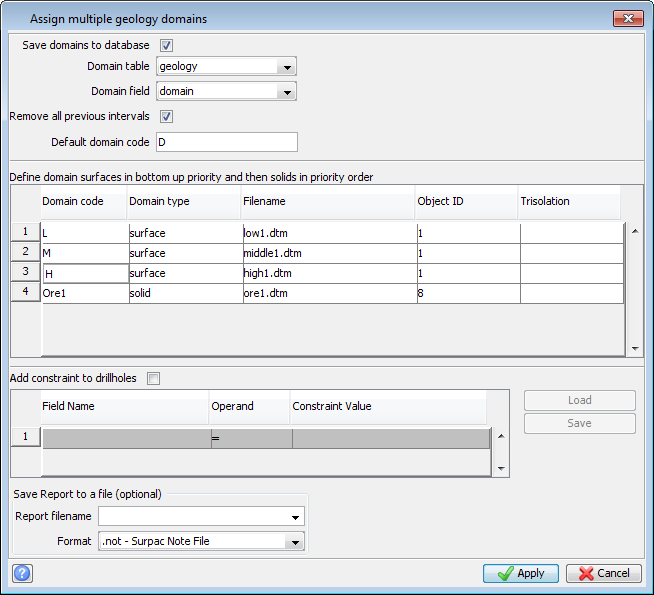
Fields on the Assign multiple geology domains form
| Field | Description |
|---|---|
| Save domains to database |
|
| Domain table |
The table you want to save the domains to. |
| Domain field |
The field, in the domain table, that stores the domain value. The domain field must exist in the database before you run this function, and the domain field must have either a character or integer data type. For each interval in a drillhole, a domain value is written to the domain field.
|
| Remove all previous intervals |
|
| Default domain code | The domain code assigned to any part of a drillhole that is neither above the surfaces you specify in the Domain code table, nor inside a solid specified in the Domain code table. If you leave this field blank, parts of a drillhole that would have been coded with the default code are not saved to the database. |
| Minimum interval | Intervals of this length or less are not saved in the geological database. The length of the interval is allocated equally to the interval above, and the interval below, the removed interval. |
| [Domain code table] | This function processes each of the surfaces in the order specified in the Domain code table. Because the parts of the drillholes above each surface are coded during processing, you should enter the surface that is stratigraphically lowest, on the first row. Each of the other rows represents the next surface stratigraphically above the previous one. |
| Domain code | A unique domain code that is applied to portions of the drillhole above the surface or inside the solid. |
| Domain type | For the function to work, you must specify whether the object represents a surface (DTM or folded surface) or a solid. |
| Filename | The DTM file that contains the solid or surface. |
| Object ID | The ID of the object of interest in the DTM file. |
| Trisolation | The range of trisolations to use for this domain. To use all trisolations in the object, leave this field blank. |
| Add constraint to drillholes |
|
| [Constraint table] | You can add more than one row to the Constraint table. The OR operator is used between multiple rows. |
| Field Name | The name of the field, in the collar table, to use in the constraint. |
| Operand | The operator, such as = > or <=, that defines the field constraints. |
| Constraint Value |
The value for the constraint you want to apply. For example, to process all drillholes further north than 7000mN, you could use: FIELD NAME: y OPERAND: > CONSTRAINT VALUE: 7000. |
| Load | To load previously saved constraints, click this button, and select the file containing the saved constraints. Click Apply to fill the table with the constraint from the file. |
| Save | To save the currently entered constraints to a file, click Save, and specify the name of a file to save the constraints. |
| Save Report to a file (optional) | |
| Report filename |
The name of the report file to create. Leave this field blank if you do not want to write a report. The report contains the inputs to the function, a message indicating whether the function completed successfully or not, and a list of the coded drillhole intervals. |
| Format | The file format of the report. |
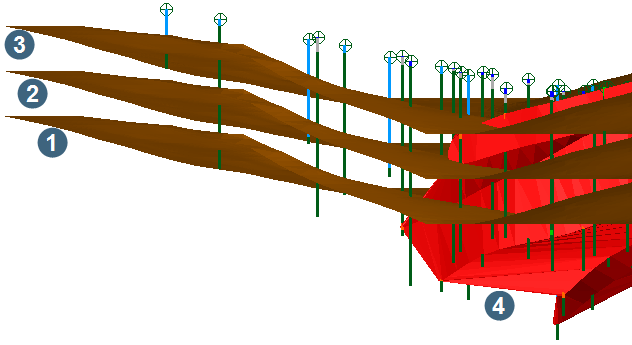
 Graphical example of ASSIGN MULTIPLE DOMAINS
Output
Each drillhole inside the drillhole constraints you specified is intersected with each surface and solid that you specified. The coded intervals are written to the report file and, if you chose to save the domains to the database, the domain codes are saved to the interval table you chose.