


Ordinary kriging
This function estimates values into block model attributes based on the weighted values of data points selected within a search ellipsoid centered on the block.
To run this function: Choose Block model > Estimation > Ordinary kriging, or...
Before using this function, you should have identified the attribute and domain, as well as an appropriate variogram model and anisotropy ellipsoid parameters for the domain.
Attribute Name
The estimated value that is being modeled must be stored in a real or float attribute. The attribute must exist before you can select it.
Anisotropic distance to nearest sample
The smallest anisotropic distance to a sample, for the block being estimated. This is calculated based on the orientation of the sample to the centroid of the block being estimated, and the anisotropy parameters.
To store this value, you can select an existing float or real attribute, or enter a name for a new attribute. If you enter a name, a new float attribute is created with three decimal places and a background value of -99.000. If you leave this field blank, no attribute is created, and the anisotropic distance to the nearest point is not stored.
 Note: If an isotropic condition is defined (by setting the major/semi-major ratio to 1 and the major/minor ratio to 1), the anisotropic distance is equal to the real world distance from the block centroid to the sample. If anisotropy is used (major/semi-major ratio and major/minor ratio are both greater than 1), the anisotropic distance to a sample will be different to the real world distance.
Average anisotropic distance to samples
The anisotropic distance to each sample is calculated based on the orientation of the sample to the centroid of the block being estimated, and the anisotropy parameters. The average anisotropic distance to all samples is the sum of all anisotropic distances from the block centroid to the informing samples divided by the number of samples.
Average anisotropic distance = sum of (anisotropic distances for the block being estimated) / number of samples
To store this value, you can select an existing float or real attribute, or enter a name for a new attribute. If you enter a name, a new float attribute is created with three decimal places and a background value of -99.000. If you leave this field blank, no attribute is created, and the average anisotropic distance to the nearest point is not stored.
Note: If an isotropic condition is defined (by setting the major/semi-major ratio to 1 and the major/minor ratio to 1), the anisotropic distance is equal to the real world distance from the block centroid to the sample. If anisotropy is used (major/semi-major ratio and major/minor ratio are both greater than 1), the anisotropic distance to a sample will be different to the real world distance.
Number of samples
The number of samples that fall within the anisotropy ellipsoid, centered on the block centroid.
To store this value, you can select an existing integer attribute, or enter a name for a new attribute. If you enter a name, a new integer attribute is created with a background value of -99. If you leave this field blank, no attribute is created, and the number of samples is not stored.
Kriging variance
This is a measure of the distribution of the data around the block being estimated. It is only related to the location of the data around the block and the variogram model. Low kriging variance values can indicate good distribution of data around the block. High kriging variance values can occur when data is clustered, or poorly distributed around the block. Kriging variance is sometimes useful in classifying ore into measured, indicated and inferred categories.
Kriging variance = sum of (weighted point to block variance) - (variance within the block) + LaGrange multiplier
To store this value, you can select an existing float or real attribute, or enter a name for a new attribute. If you enter a name, a new float attribute is created with three decimal places and a background value of -99.000. If you leave this field blank, no attribute is created, and the kriging variance is not stored.
Block Variance
The difference in value between the average value for variance of all samples in the block model, and the variance of samples within an individual block.
Block variance = average sample variance - block sample variance
To store this value, you can select an existing float or real attribute, or enter a name for a new attribute. If you enter a name, a new float attribute is created with three decimal places and a background value of -99.000. If you leave this field blank, no attribute is created, and the block variance is not stored.
Kriging Efficiency
The kriging efficiency is calculated by dividing the difference between the block variance and the kriging variance by the block variance. Kriging efficiency can be used to determine optimum block size, and for classifying individual blocks into resource categories such as measured, indicated, and inferred.
Kriging efficiency = (block variance - kriging variance) / block variance
To store this value, you can select an existing float or real attribute, or enter a name for a new attribute. If you enter a name, a new float attribute is created with three decimal places and a background value of -99.000. If you leave this field blank, no attribute is created, and the kriging efficiency is not stored.
Number of negative weights
The number of samples which receive negative weights during the ordinary kriging estimation. Often, where informing samples are clustered, some samples receive negative weights. The number of samples which were assigned negative weights can be used for classifying individual blocks into resource categories such as measured, indicated, and inferred.
To store this value, you can either select an existing integer attribute, or enter a name for a new attribute. If you enter a name, a new integer attribute is created with a background value of -99. If you leave this field blank, no attribute is created, and the number of samples with negative weights is not stored.
Lagrange multiplier
The Lagrange multiplier is used in the kriging matrix to minimize estimation error by ensuring that the weights of the sample values used to krige a block sum to 1. A large positive value for the Lagrange multiplier generally indicates that samples are far from the block, or are highly clustered. A large negative value for the Lagrange multiplier usually indicates that samples are too close to the block, or are widely spaced around it. The Lagrange multiplier can be used for classifying individual blocks into resource categories such as measured, indicated, and inferred.
To store this value, you can select an existing float or real attribute, or enter a name for a new attribute. If you enter a name, a new float attribute is created with three decimal places and a background value of -99.000. If you leave this field blank, no attribute is created, and the Lagrange multiplier is not stored.
Conditional bias slope
Also known as the slope of regression, conditional bias slope identifies the correlation expected between the estimated block values and the actual block values. Conditional bias slope can be used to determine optimum block size, and for classifying individual blocks into resource categories such as measured, indicated, and inferred.
Conditional bias slope = ( Block variance - Kriging variance + |Lagrange multiplier| ) / ( Block variance - Kriging variance + 2 x |Lagrange multiplier| )
To store this value, you can select an existing float or real attribute, or enter a name for a new attribute. If you enter a name, a new float attribute is created with three decimal places and a background value of -99.000. If you leave this field blank, no attribute is created, and the conditional bias sloper is not stored.
Data source type
The data to be used for estimation may be either a STRING FILE or a BLOCK MODEL.
Location, ID range, String range, D field
If the data source is a string file you must complete each of these inputs to describe the string file or files from which the sample data is to be obtained.
Enter the Location and Id range of the required string files. Enter the String range and the description field to define the data from the string file or files which are to be used for estimation.
Model name and Attribute
If the data source is Block Model then you must enter the name of the block model and the attribute field within that model which is to be used as the data source for estimation.
Constrain data?
Enter 'Y' if you wish to restrict data selection or 'N' for unconstrained selection. See Make Constraint.
Constraining the data effectively removes all sample points which are not required from the estimation process completely.
Special note:
Constraining the data source uses a block model constraint to determine which sample points to select. Consequently, if using a geometric constraint like inside a 3DM, above a DTM, etc., the sample points selected will not comply exactly with the geometric boundary. Rather they will be consistent with the block model constraint of the geometric boundary. This is an approximation which is dependent on the block model resolution.
If you checked the Constrain data? field the following field will appear:
Save constrained sample points?
Saving the constrained sample points to a string file can be used to confirm the correct constraint has been applied.
If you checked the Save constrained sample points? field the following two fields will appear:
Output location
Enter the location for the string file for saving the constrained points.
Output id number
Enter the ID for the string file for saving the constrained points.
Choose Apply to display the SEARCH PARAMETERS form or Cancel to return to the BLOCK MODELLING menu.
Search type
Enter the search type which may be ELLIPSOID or OCTANT.
A 3D ellipsoid search can be used if the data points used are reasonably distributed and do not show any significant clustering. It simply uses the nearest samples to the block being estimated up to the maximum number of samples specified.
An octant search should be used where there is significant clustering of data points. It divides the horizontal plane into eight equal areas and takes up to n/8 samples from each octant for use in the estimation where 'n' is the specified maximum number of samples. If there are too many empty octants around a block then that block will not be estimated.
Use the Ellipsoid Visualiser to assist in defining your search ellipsoid.
Minimum number of samples to select
This sets a lower limit on the number of samples to use for the estimation so as to ensure a valid estimation.
Maximum number of samples to select
This sets an upper limit on the number of samples to use for the estimation to minimise processing time.
Maximum search radius
The maximum search distance is used in conjunction with the maximum number of samples to select samples to be used in the kriging calculations. It should generally (although not necessarily) be set to a value slightly greater than the range of the variogram of the major axis. The exception to this would be where it has been established that the kriging weights based on a typical block / sample configuration tend to zero at a distance shorter than this range. While the range of the variogram gives the maximum distance at which there is some correlation between data points, it is the magnitude of the kriging weights that ultimately determine the distance o which significant samples will be found.
The maximum search radius is measured in the direction of the major axis.
The search distances for the semi-major and minor axes are influenced by the anisotropy ratios which are used to define the shape of the ellipsoid. Only if these ratios are both equal to 1.0 will the maximum search distance be equal in all directions.
Maximum vertical search distance
This allows rejection of a data point if it is too far away vertically from the block to provide a meaningful estimation. Note that this is a VERTICAL search distance and is not influenced by the orientation of the search ellipsoid. To be used in estimating a value for a block, a point must first fall within the search ellipsoid and it must also be within the maximum vertical search distance.
Constrain by drill hole?
This option allows you to constrain sample points by selecting a limited number from each drill hole. This option will only appear if you defined your data to be from a string file (ie it won't appear if you have defined block model data).
If you checked the Constrain by drill hole? field the following two fields will appear:
Desc field
Enter the description field that contains the drill hole id. Hint: String file data is often produced from Surpac compositing functions. Each compositing function describes which description field the hole id is saved to, so the online documentation for the compositing function of interest should be reviewed for further details on where the hole id is stored.
Maximum number of samples per drill hole
Enter the maximum number of samples per hole that can be used in the estimation.
Maximum number of adjacent octants with no samples
This defines the maximum number of adjacent octants which may have no samples and yet calculations will still be performed (octant search only).
Bearing of major axis
This is the bearing of the long axis of the search ellipsoid. The anisotropy defined by this ellipsoid is used to determine the distances of samples from the block centroid in order to select those that will inform the estimate.
Plunge or pitch of major axis
This is the angular displacement of the major axis from the horizontal in a vertical plane through the major axis. The displacement is negative if the major axis plunges downwards.
Plunge is measured from a horizontal plane (measured from X or Y when rotation convention is ZXY or ZYX) and pitch is a measurement form an inclined plane (measured from Z axis if the rotation convention is ZXZ or ZYZ).
Dip of semi-major axis
This is the angular displacement of the semi-major axis from the horizontal in a vertical plane normal to the major axis. The displacement is positive if the dip is to the left looking down the plunge of the major axis.
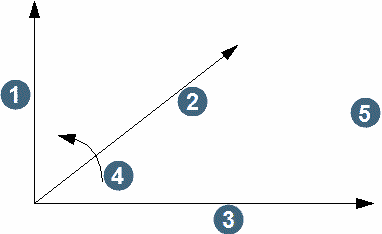
1. minor axis
2. major axis
3. semi-major axis
4. positive tilt direction
5. tilt about major axis
ANISOTROPY RATIOS
major / semi-major
This is the ratio of the length of the major axis to the length of the semi-major axis.
major / minor
This is the ratio of the length of the major axis to the length of the minor axis.
Choose Apply to display the KRIGING PARAMETERS form or Cancel to return to the DATA SOURCE SPECIFICATIONS form.
Variogram file name
Enter the file name containing the variogram model parameters to use. After a value is selected and focus is moved to another field on this form, the file will be read and the variogram model parameters will be populated into the variogram parameter fields. These fields can be modified if necessary before applying the form. Leave this field blank if the variogram model parameters to use have not been saved to a file.
Variogram model
Enter the model type which is to be used for kriging. This may be one of Spherical, Nested Spherical, Exponential, Gaussian, or Hole Effect.
Number of structures
This can be 1 - 5 for Nested Spherical models, and must be 1 for all other model types.
Nugget(Co)
This is the nugget value for the model.
Sill(C(#))
This is the difference between the total sill and the nugget. A value for each structure is required.
Range (A(#))
This is the range of the model. A value for each structure is required.
ANISOTROPY PARAMETERS (one per structure)
Bearing
This is the bearing of the long axis of the anisotropy ellipsoid for this structure. The anisotropy defined by this ellipsoid is used to determine the distances of informing samples from the block centroid. The defaults provided are those of the search ellipsoid.
Plunge
This is the angular displacement of the major axis from the horizontal in a vertical plane through the major axis. The displacement is negative if the major axis plunges downwards.
Dip
This is the angular displacement of the semi-major axis from the horizontal in a vertical plane normal to the major axis. The displacement is positive if the dip is to the left looking down the plunge of the major axis.
Major/Semi
This is the ratio of the length of the major axis to the length of the semi-major axis.
Major/Minor
This is the ratio of the length of the major axis to the length of the minor axis.
Number of descretisation points
These points will be distributed evenly through the block to provide targets for estimation and will then be averaged to provide an estimate for the entire block.
Output filename
Enter the name of a `.not' file to which to write estimation parameters.
Include debug output
Check this box if you want additional information. Leave it unchecked if you want only a summary of the estimation parameters.
Additional information included in the debug output:
- Estimated Grade
- Kriging variance
- Standard deviation * 2
- Block variance
- Kriging efficiency = (block variance - kriging variance) / block variance
- Slope of regression = standard deviation / Estimated grade
- Conditional bias slope = (block variance - kriging variance + | LaGrange |) /
(block variance - kriging variance + |2 * LaGrange |)
Constrain interpolation
Check this box if you wish to restrict the blocks to be estimated inside a constraint. Leave the box unchecked for unconstrained interpolation. See Make Constraint.
Choose Apply to perform kriging estimation or Cancel to return to the SEARCH PARAMETERS form.
Result
A value will be estimated for the nominated attribute within the blocks selected by the search ellipsoid and constraints.
Messages
WARNING - Negative kriging variance - check block size and/or number of descretisation points
A negative kriging variance will occur if the dispersion variance of a block is greater than the weighted average extension variance of the samples informing the block. This may be due to overly large blocks relative to the spacing between samples, an insufficient number of discretization points used to characterise the block, or an unfortunate coincidence of sample and discretization points. No block will be written where a negative kriging variance occurs. If it becomes obvious that negative kriging variances are being calculated for each block, the function may be halted using the ABORT key.