


Nearest neighbour estimation
You use this function to assign values to blocks in the model by assigning the values from the nearest sample point to the block attribute of interest.
To run this function: Choose Block model > Estimation > Nearest neighbour, or...
- In the Function Chooser, type BM FILL NEAR NEIGHBOUR, and press ENTER.
- In the Function Chooser, type BM FILL NEAR NBR, and press ENTER.
Determining the nearest neighbour can include a 3D search ellipsoid and maximum search distance to limit the blocks that are affected.
The source of sample data for estimation can be either a string file or another block model.
Fields on the Data source specifications form
| Field | Description |
|---|---|
| Data source type |
|
| Location | The name of the string files that contain the data you want to use for estimation. |
| Id range | The Id range of string files you want to use for estimation. |
| String range | The range of string files that contain the data you want to use for estimation. |
| Constrain data |
|
| Save constrained sample points |
|
| Output location | The name and directory location where you would like to save the constrained sample points. |
| Output id number | The id number for the string file containing the constrained sample points. |
| Attribute to fill | The names of the attributes you are modelling. These attributes can be modelled from the same, or different, description fields in the string file, or from different attributes in the block model. |
| Description Field | The description field for the attribute. If you are estimating from a string file, you must complete this field. |
| Attribute Name | The name of the attribute. If you are estimating from a block model, you must complete this field. |
| Anisotropic dist to nearest sample | The attribute to store the anisotropic distance to the nearest informing sample. This must be a real attribute. If you leave this field blank then the estimation attribute is not stored. |
 Note: When you constrain the data source, a block model constraint is used to determine which sample points to select. If you use a geometric constraint that involves a solid or surface, such as inside a 3DM or above a DTM, the sample points selected will not comply exactly with the geometric boundary. Instead they will be consistent with the block model constraint of the geometric boundary. This approximation is dependent on the block model resolution.
Fields on the Nearest neighbour search parameters form
| Field | Description |
|---|---|
| Maximum search radius |
The maximum search distance to locate samples for estimation, measured in the direction of the major axis. The search distances for the semi-major and minor axes are influenced by the anisotropy ratios which are used to define the shape of the ellipsoid. Only if these ratios are both equal to 1.0 will the maximum search distance be equal in all directions. |
| Maximum vertical search distance |
The maximum vertical distance to a sample for use in estimation.
|
| Search Ellipsoid Specifications | |
| Ellipsoid orientation | |
| Bearing | The bearing of the long axis of the search ellipsoid. |
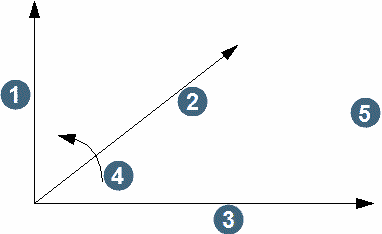
| Plunge | The angular displacement of the major axis from the horizontal in a vertical plane through the major axis. The displacement is negative if the major axis plunges downwards. Plunge is measured from a horizontal plane (measured from X or Y when rotation convention is ZXY or ZYX). |
| Dip |
The angular displacement of the semi-major axis from the horizontal in a vertical plane normal to the major axis. The displacement is positive if the dip is to the left looking down the plunge of the major axis.
1. minor axis |
| Anisotropy ratios | |
| major/semi-major | The ratio of the length of the major axis to the length of the semi-major axis. |
| major/minor | The ratio of the length of the major axis to the length of the minor axis. |
| Rotation Convention | The order of the axis and rotation direction for each axis. The drop down lists commonly used rotations. To define an alternative that is not listed, choose 'Other' and use the option buttons to select the rotation you require. |
| Constrain interpolation? |
|
| Report file name | The name of the file to contain the estimation parameters. |
| Format | The file format for the file to contain the estimation parameters. |
Output
The values for the selected blocks are estimated for the modelled attribute according to the estimation parameters entered.