


Options
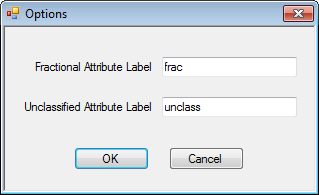
You use the Options dialog box to create the labels used for attribute names during the reblocking process. After you name the labels, they are saved.
To open the Options dialog box, click the Application button  , and then click Options.
  Options dialog box
| Field | Description |
|---|---|
| Fractional Attribute Label | Label for attributes that are percentages of calculated values during the reblocking process. |
| Unclassified Attribute Label | Label for attributes that have yet to be classified into categories during the reblocking process. |